Choirside gives every singer in your choir the practice tracks for their own voice part, on their phone, in one place. If your rehearsal preparation currently involves emailing four MP3s to forty people and answering “which one is mine?” for a fortnight, that is the job it does.
This page is the honest version: what it does today, and what it does not do. The second list is the one worth reading before you sign up, because it is the one nobody discovers until afterwards.
What it does
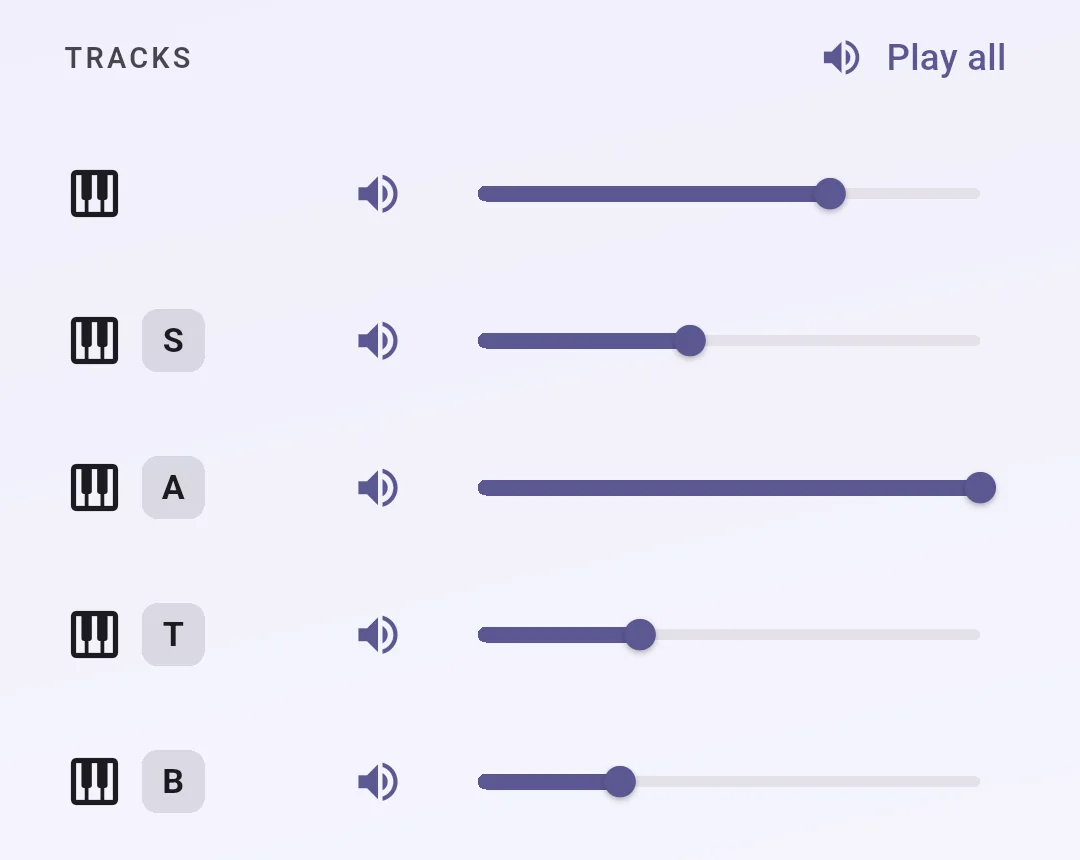
- One song, many tracks. A song holds an instrumental or piano accompaniment and a recording per voice part. Singers open the song and get a mixer, so they can push their own part up and the rest down until they can hear what they are meant to be singing.
- Loop the eight bars nobody can get right. Set an A and a B point and it repeats between them.
- Sing along to the accompaniment. A singer can record their own part against the backing track, in time with it, and listen back. Takes are kept on their phone, as many as it holds, and nothing is uploaded unless they choose to upload it. A take they do upload stays private from the rest of the choir, though you and your section leaders can hear it.
- Sectional tracks recorded by your own people. A member can record a part for the rest of their section. You approve it before the choir hears it.
- Announcements, bulletins and polls, if you turn messaging on.
- A calendar of rehearsals and performances, if you turn that on too.
What it does not do
- No sheet music. Choirside does not hold PDFs or scanned scores, does not display them, and has no plan to. Uploads are audio only. Your singers still get their music the way they get it now.
- No browser version. It is a phone and tablet app. A singer without a smartphone or tablet cannot take part, and there is no web page they can use instead. See what your singers need.
- No private messages. Announcements, bulletins and polls go to the choir or to a group. There is no direct message between two people, deliberately. See messaging your choir.
- No video. Audio only.
- Singers do not choose their own voice part. You set it for each member, which is usually what a director wants, but it does mean a new singer cannot sort themselves out without you.
- Attendance is not finished. The tab and the setting exist; there is no member-facing screen behind them yet.
- Push notifications and text messages are not switched on yet. An announcement reaches your choir in the app and by email today. The other two channels are described in our terms and are on the way, but do not plan a cancelled-rehearsal text around them.
The kind of choir it fits
It suits a choir that rehearses regularly, has parts to learn between rehearsals, and has singers who mostly carry a phone. Church choirs, school choirs, community choirs, and choral societies are what it was built around.
It fits less well if your singers read at sight and do not practice between rehearsals, if most of them do not use a smartphone, or if what you actually need is score distribution rather than audio.
What it costs
Nothing while we are in beta, and members never pay anything at any point. The full answer, including what happens when we do start charging and the founding choir discount, is on pricing. A feature-by-feature table of what each plan includes is on plans.
Before you upload anything
Most published choral music is under copyright, including the arrangement and any accompaniment track. A subscription to Choirside grants you no rights to the music you upload, so it is worth reading copyright and licensing before you build a library. It is the question directors most often get wrong.
Ready?
Getting started as a director walks through setting up a choir, which takes about ten minutes.